
Font'N'Ater By Treasure Marie Denise Jackson
✍️ Font'N'Ater — Create Your Own Fonts
The second one made with Grok is better with more functionality.
Font'N'Ater is a font maker you can use to make your own font and save it in 4 different font file types as well as share them and use them in softwares like Quest or websites. you can also make your own emojis!
Font'N'Ater
By Treasure Marie Denise Jackson
This was made so you could make your own font and upload it and copy and paste it it onto other sections!
Draw it. Type with it. Save it. Use it anywhere.
Font'N'Ater, created by Treasure Marie Denise Jackson, is an interactive font-creation tool designed to let you draw your own letters and turn them into a usable font.
Instead of choosing from someone else's typefaces, you can create your own.
🎨 Create a Font From Scratch
Font'N'Ater guides you through an interactive tutorial where you'll create your first custom font, one character at a time.
Once you're finished, you can:
✏️ Draw your own letters
🔤 Create a complete custom typeface
😀 Design custom emojis that can be typed using your font
💾 Save your creation as a font file
📥 Import the font into compatible software
📝 Write directly inside Font'N'Ater using your new typeface
📋 Copy and paste text created with your font
The ultimate goal is simple:
Create a font file that you can actually save and use.
🌐 Bring Your Font Into Your Projects
The tutorial demonstrates how custom fonts can be incorporated into writing and game-development workflows, including projects using:
Wattpad, Webnovel, Squiffy, Quest, Storyfall, GoodNovel, Fictionry, Qwip, Rezona, Rosebud, Aippy, Loopit, Grok, Supercool, Replit, TextingStory, Sekai, GameMaker, and ibis Paint X.
If you have a website or application that primarily allows text, Font'N'Ater's concept is to let you turn your artwork into a custom typeface that can be used as text rather than relying on an image.
🖥️ Write With Your Font
Font'N'Ater isn't just a font editor—you can also write inside the application using your newly created typeface.
Your writing can be saved in formats including:
.DOC
.DOCX
.RTF
.PDF
.TXT
😀 Custom Emoji Fonts
Want an emoji that doesn't exist?
Draw it. Add it to your font. Type it.
Font'N'Ater allows you to create custom characters and emoji-like symbols that can become part of your personal typeface.
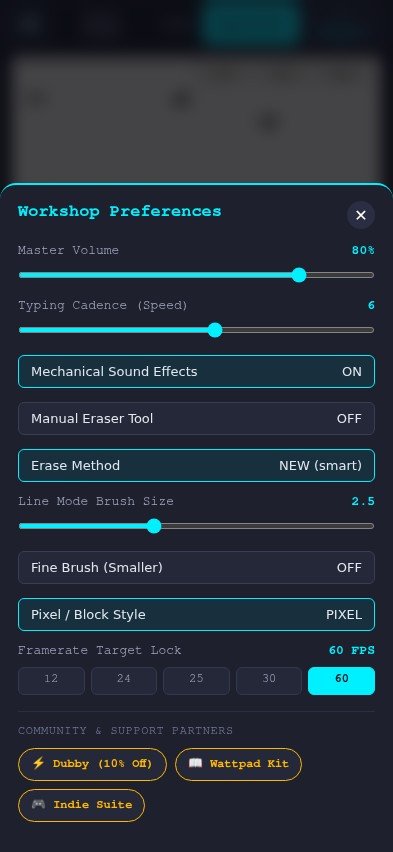
⚙️ Settings
Open Settings by tapping the ⚙️ button in the upper-left corner.
Available options include:
🔊 Volume
⌨️ Typing Speed
⌨️ Typewriter On/Off
🎞️ Frame Rate
12 FPS
24 FPS
25 FPS
29 FPS
30 FPS
☁️ Save Your Font
Once you've created your font, you can save the font file to your computer and back it up using cloud storage services such as TeraBox, which offers up to 1 TB of cloud storage.
🔗 Creator Links & Support
The Settings menu also provides access to the creator's websites, behind-the-scenes content, projects, and support/referral links.
My Website
My Brand New Store
Make a Dubby Energy Drink!
Dubby — TREASUREJACKSON discount link
Behind the Scenes of My Work
Stories More — Behind the Scenes
Support the Author — Meshy Referral
Support the Author — Hi3D Referral
Diana's Hunt: Ida's Game of Cult Tyranny
Support the Author — PayPal
Support the Author — Tesana Referral
🧪 An Experimental Creative Tool
Font'N'Ater is built around a simple idea:
What if you could draw your own alphabet and turn it into something you can actually type with?
Create a font for a story.
Create one for a game.
Create one for your artwork.
Create weird symbols and custom emojis.
Or simply make a typeface that belongs entirely to you.
Draw your letters. Build your font. Make it yours.

